Tạo, khám phá, và tải về nội dung cho trò chơi của bạn
Xem phía dưới để tìm những nội dung do người chơi tạo cho trò chơi của bạn. Quan tâm tới việc tạo ra chúng? Nhấn vào đây để biết thêm chi tiết.
Duyệt tìm Tất cả Workshop
2 nội dung
xem tất cả 2 nội dung
 
5 nội dung
xem tất cả 5 nội dung
 
21 nội dung
xem tất cả 21 nội dung
 
1 nội dung
xem tất cả 1 nội dung
 
111 nội dung
xem tất cả 111 nội dung
 
8 nội dung
xem tất cả 8 nội dung
 
4 nội dung
xem tất cả 4 nội dung
 
75 nội dung
xem tất cả 75 nội dung
 
< >
Hiển thị 1-8 trên 2,935 kết quả
TIN TỨC WORKSHOP MỚI NHẤT

Với bản cập nhật Steam ngày hôm nay, mục item trong Steam Workshop giờ sẽ có thông tin về khả năng tương thích với phiên bản trò chơi trước đó. Sau khi tính năng này được bật bởi nhà phát triển trò chơi, nhà sáng tạo mod có thể chỉ định phiên bản trò chơi mà họ biết hoạt động với phiên bản hiện tại và trước đó của mục item Workshop.

Cập nhật tới Steam Workshop lần này được thiết kế để hoạt động cùng một bộ API Steam mà nhà phát triển có thể sử dụng để quản lý phiên bản trước đó của trò chơi. Để biết thêm thông tin chi tiết về cách nhà phát triển quản lý phiên bản trò chơi, vui lòng ghé qua bài viết Mới! Quản lý phiên bản cho mod Steam Workshop.

Có ba nội dung chính cho bản cập nhật Workshop này:

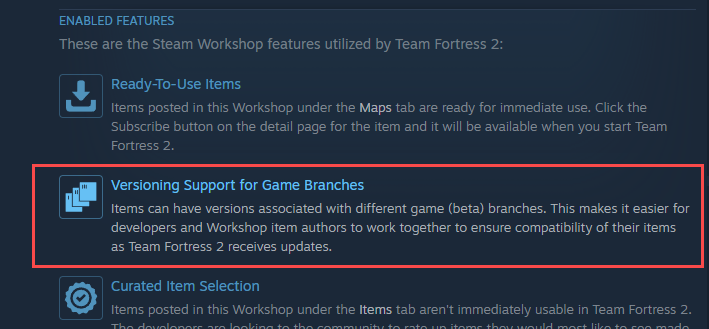
  1. Thiết lập có chủ đích bởi nhà phát triển. Trước tiên, điều quan trọng nhất là nhà phát triển trò chơi phải có chủ ý về cách sử dụng nhánh build trò chơi và bảo toàn những phiên bản trò chơi trước đó. Để thực hiện điều đó, nhà phát triển trò chơi phải lưu giữ build trước đó của trò chơi dưới dạng nhánh được đặt tên và sắp xếp theo thứ tự có chủ ý. Nhà phát triển cũng nên chọn "Bật phiên bản nhánh của trò chơi" trong thiết lập Workshop trò chơi. Bạn sẽ biết tính năng đã kích hoạt khi thấy hiển thị dưới dạng tính năng trong mục thông tin Workshop.

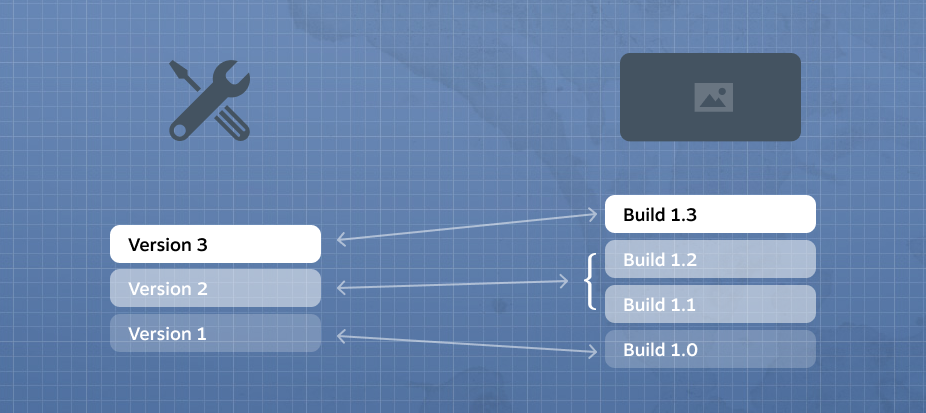
  2. Tải lên đồng thời nhiều phiên bản mod của một mục item. Mod trên Steam Workshop vốn đã hỗ trợ lịch sử phiên bản, cho phép nhà sáng tạo có thể chuyển mod về phiên bản trước đó nếu cần. Bản cập nhật mới này cho phép người chơi truy cập cùng lúc hai hoặc nhiều phiên bản của một mục item.

  3. Chỉ định phạm vi phiên bản trò chơi mà mỗi phiên bản mod hỗ trợ. Để hỗ trợ người chơi truy cập nhiều phiên bản mod, phiên bản mục item Workshop giờ có thể chỉ định phạm vi thuộc một hoặc nhiều build trò chơi mà nhà sáng tạo biết bản mod được hỗ trợ. Nếu không chỉ định phạm vi, Steam sẽ cho rằng phiên bản này hoạt động với bất kỳ bản build nào của trò chơi. Nếu có nhiều hơn một phiên bản của mục item Workshop được chỉ định tương thích với phiên bản hiện tại của trò chơi, thì phiên bản tải lên mới nhất của mục item sẽ được Steam chọn để tải xuống.

Chúng tôi biết rất nhiều nhà sáng tạo mod sẽ không có thời gian để kiểm tra xem mod của họ có hỗ trợ phiên bản mới nhất của trò chơi. Vì thế chúng tôi xây dựng hệ thống này để hỗ trợ phạm vi bao gồm hoặc loại trừ những bản cập nhật trong tương lai. Nếu mod nhìn chung chỉ là mục item đơn giản và có khả năng cao hoạt động với phiên bản trò chơi mới, thì có thể hợp lý nếu thiết lập phạm vi không giới hạn phiên bản. Tuy nhiên, nếu bản mod phức tạp và nhà sáng tạo mod cần phải thử mod với phiên bản trò chơi mới trước khi công bố khả năng hỗ trợ, thì có thể thực hiện dễ dàng bằng cách thiết lập phạm vi hỗ trợ.

Có thể xem và thay đổi thiết lập này trong thẻ "Ghi chú thay đổi" của mục item Workshop.

Lưu ý: Nhà phát triển trò chơi cũng có thể thiết lập công cụ tải lên Workshop để đặt phiên bản hỗ trợ khi tải lên hoặc cập nhật mục item Workshop.

Hỏi đáp

Hỏi: Tôi không thấy tùy chọn chỉ định phiên bản trò chơi hỗ trợ cho tác phẩm Workshop của mình. Đáp: Hãy chắc rằng nhà phát triển đã chọn thiết lập "Bật phiên bản nhánh của trò chơi" trong thiết lập Steamworks của trò chơi. Điều đó cho thấy nhà phát triển đã chủ ý sắp xếp thứ tự phiên bản trò chơi.

Hãy tìm biểu tượng này ở dưới phần "Tính năng đã kích hoạt" trong trang "Giới thiệu" Steam Workshop của trò chơi.

Based on your feedback from the recent Steam Workshop changes outlined here, we've added some additional features around Workshop subscriptions: you can now easily create, save, and load different subscription lists using Workshop Collections. This will make it easier to create "presets" or "mod lists" that you can swap between for whatever reason.

In the Steam Client (beta), you can access your Workshop Collections on your game's Properties > Workshop page under Advanced Options. From here you can quickly save your subscriptions list to a collection, or update your subscriptions list from a collection. The load order for your items will match the order of subscriptions within the collection.

We've also made it easier to share the mods you are using with your friends - Workshop Collections can now be shared via a link from within the Steam Client. (note that you'll need to save your subscriptions to a collection before you can send a link to a friend).


On the Steam Community, the "Save to Collection" button is accessible on your subscriptions page for a game. On a collection's web page, the "Subscribe to all" button will now give you a choice of adding to or overwriting your current subscription list. There’s also an option to save a collection’s contents to another collection.

There have also been some small updates to the Collection editor itself to make managing items a bit easier.

  • Added the ability to sort items by Time Created or Time Updated
  • Added the ability to sort items in ascending or descending order
  • Added the ability to add or remove all items from the selected section (e.g. item's you've published, favorited, or subscribed to)
  • Added ability to quickly remove all items or linked collections
We've recently added some features to the Workshop that should be pretty useful for both new and power users alike.

The new Steam Client beta has various improvements around Workshop, including displaying which item is being downloaded in the Downloads page, and an improved interface for dealing with your Workshop item subscriptions (accessible from your game's Properties dialog). The subscription list now contains additional information, such as when the item was last updated, when you subscribed to it, and any item dependencies. You can also filter your list by name or by tag.


For more advanced use cases, you can disable items from being loaded by your game. And you can now change the local load order for your items. Also, if Workshop creators have set their items as depending on other items, you can automatically set the load order based on these dependencies. Missing dependencies will also be displayed, to make it easier to see why some mods are not working. You can opt into the Steam Client beta to try out these changes.


On the web side of things, we've added Saved Search Queries. Basically, if you often find yourself searching/sorting/filtering to find the same kind of items in a game's Workshop, you can now save those search query parameters. Then you can re-run your search at any time by selecting that saved search query from your game's Workshop home page.

We've also added some more browsing options to the main Workshop Home page. You can now filter to games that have Workshops based on whether you recently visited them, and we've brought back the ability to view Workshops for games you own or have recent playtime in.

Plus a few other web changes:
  • Added the ability to subscribe to an item and all the items it depends on
  • Added previous and next buttons to the image viewer
  • Adding an item to a collection no longer reloads the web page
  • Allow unlisted and friends-only items to be added to a collection

Let us know your thoughts in the Steam Client Beta discussions.


Hôm nay chúng tôi ra mắt một vài cải thiện về cách tìm kiếm trong Steam Workshop.

Với bản cập nhật này, khi bạn tìm kiếm trong Workshop của một trò chơi, kết quả giờ sẽ bao gồm khớp chuỗi theo phần và sắp xếp ưu tiên theo kết quả liên quan nhất, có xem xét theo độ phổ biến và đánh giá người dùng.

Bạn có thể thử qua các cải thiện tìm kiếm bằng cách duyệt qua trang Steam Workshop của trò chơi mình ưa thích.
When preparing the Workshop page for your mod or item, you now have the option to include a 3D Sketchfab preview of your item along with your videos and screenshots.

Here’s an example from johnskyrim’s Doomhammer, a Skyrim weapon mod:
https://sketchfab.com/models/7b08add6fb40478a9bc465a8ef0d8ffb
This can be used to provide an interactive 3D presentation of your model, scene, or item that users can zoom, pan, or rotate around to get a better view of your submission.

To include a Sketchfab preview, you’ll need to create a free account on Sketchfab’s website (http://sketchfab.com/) and upload your model there similar to how you go about posting a video to YouTube. Once your item has been posted to Sketchfab and you have a page on their site, you may enter that URL in the new field provided in the Steam Workshop when editing the screenshots and videos for your item.

The Sketchfab preview can also be inserted into Steam Community Discussions, Announcements, and Greenlight submissions.

Here are a few more examples:
City Skylines:
https://sketchfab.com/models/5948e8c389284f10993f882ca329223b
https://sketchfab.com/models/fa7d5fb3b9b14278be24afadf9d806bd

XCOM 2
https://sketchfab.com/models/184115675e484032944ec31d9dbcadd2